VPN for BBC iPlayer (2026): Can the BBC Tell, and What Still Works
Yes, BBC iPlayer can usually tell when you're using a VPN, and it refuses to play when it does. The BBC's own help pages say it locates you from your IP address and that programmes won't play when it detects what may be "a VPN or proxy". That makes iPlayer one of the hardest services for a VPN to open, and the BBC says programmes can't be streamed outside the UK even on holiday, which includes people who hold a TV Licence. The one route the BBC itself supports abroad is downloading programmes in the UK before you leave.
This page answers the question people actually type, can the BBC tell if you use iPlayer with a VPN on, using only what the BBC has published, then sets out the licence rule, the errors and a step-by-step plan for travellers. If iPlayer is one of several services you watch, compare the field in our best VPNs for streaming.
Yes, iPlayer can usually tell: here's how
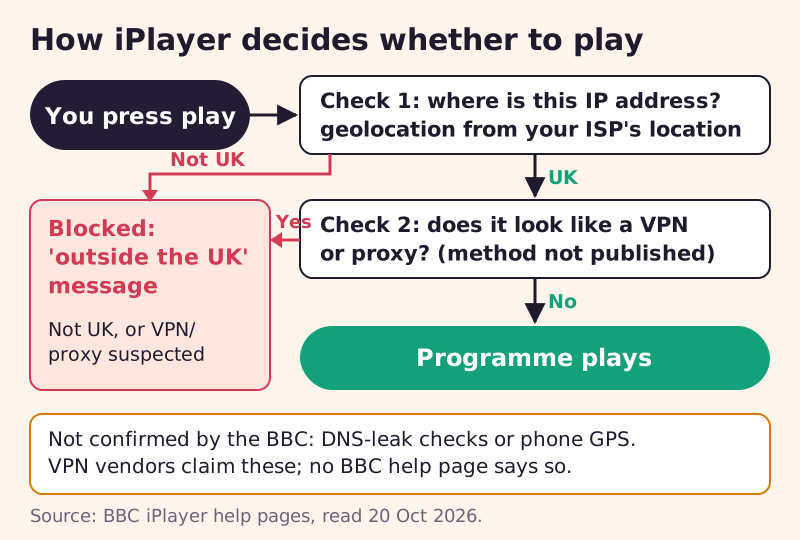
The BBC describes two checks. First, location: "The BBC uses geolocation technology to identify where you are, based on the location of your internet service provider (ISP)." Your IP address is looked up in location databases, and if it maps to somewhere outside the UK, programmes won't play. Second, the type of connection: playback is refused when the BBC thinks a VPN or proxy is in use, "because we will not be confident of your location".
The second check is the one that matters for VPN users. A UK VPN server passes the first test, because its address is in the UK. It then has to pass the second, and the BBC doesn't say how it spots VPNs and proxies. The usual approach across streaming services is to flag addresses that belong to data centres or that many people share at once, which we explain in why streaming services block VPNs. Whatever the exact method, the result is the same: a server that has been flagged stops working for everyone using it.
The three detection layers, and which ones the BBC confirms
Most VPN guides list three layers of iPlayer detection. Only part of that list rests on anything the BBC has said, so here they are with the evidence for each.
Layer 1: IP geolocation (confirmed)
This is documented in the BBC's help pages, as quoted above. It also explains a problem UK viewers sometimes hit without any VPN: the BBC notes that when an internet provider assigns a new IP address, location databases can take a few weeks to catch up, so a brand-new connection can briefly look as if it's abroad.
Layer 2: VPN and proxy detection (confirmed, method unpublished)
The BBC confirms it refuses playback when it suspects a VPN or proxy, and it gives a telling example of how broad that net is: it says only Tor relay nodes, not ordinary Tor users, can play programmes. It also lists work, university and hospital networks as a common reason UK viewers get the outside-the-UK message, because those networks may send data through proxies or route it abroad.
Layer 3: DNS and device location (not confirmed)
Many guides say iPlayer compares your DNS servers with your IP address, or reads your phone's GPS. We could find no BBC page that says either, and an earlier version of this page repeated the GPS claim; we've removed it. A DNS or IPv6 leak can still give away your real location to any service, so fixing leaks is sensible, but we won't present it as a confirmed BBC method.
What the BBC has said, with dates
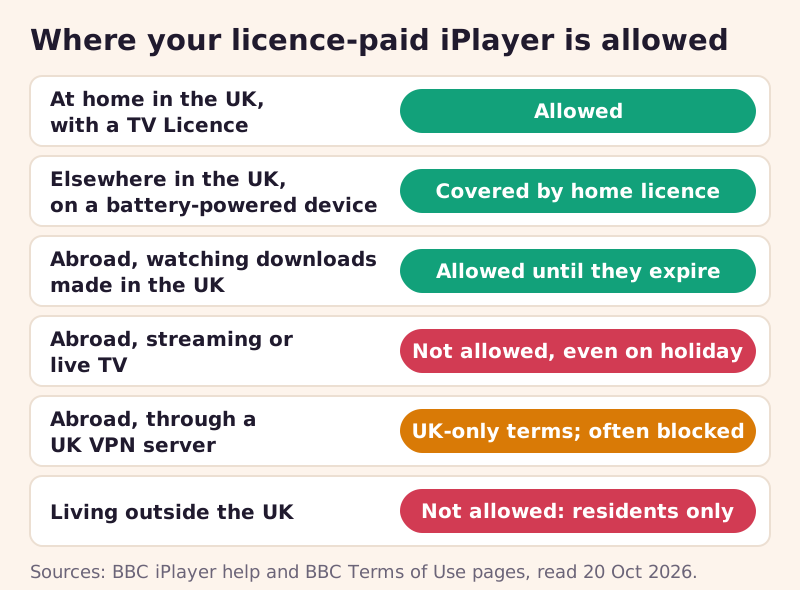
Every quote here comes from a BBC page we read on 20 October 2026. On why iPlayer is UK-only: "Due to rights agreements, you need to be in the UK to stream and download programmes or watch BBC TV channels on BBC iPlayer." On people who live abroad: iPlayer "is funded by the UK TV licence and its use is restricted to UK residents only." The BBC's Terms of Use add that if you're outside the UK "you won't be able to use BBC iPlayer, CBBC or CBeebies".
The BBC has also said what might change. Its help page says it is "interested in being able to allow UK licence fee payers to access BBC iPlayer when they are abroad", but that "there are complex technical issues to resolve" and that it depends on future UK legislation. As of October 2026, then, there is no official way for licence payers to stream iPlayer abroad.
The TV Licence rule, and why it matters more than the VPN
The legal requirement around iPlayer is the TV Licence, not the VPN. The BBC says a valid TV Licence is needed to watch or download any programme on iPlayer, live or on demand, on any device including a phone or laptop; the one exception it lists is S4C programmes watched on demand. Watching without one is a criminal offence, with a fine of up to £1,000 (£2,000 in Guernsey). From 1 April 2026 the annual colour licence costs £180, according to the UK government.
One detail helps travellers inside the UK: the BBC says your home licence covers iPlayer away from home as long as the device you're using isn't plugged in. Using a VPN, by contrast, isn't a crime in the UK, and in July 2026 the government said it would not ban VPNs or put them behind age checks. What a VPN runs into is the BBC's UK-only terms and its VPN blocking, which means blocked playback rather than prosecution. Paying for a licence doesn't change those terms, which is why we keep the two questions separate.
Why iPlayer is stricter than most services
Netflix or Disney+ abroad still works; you just see a different country's catalogue. iPlayer has no foreign catalogue to fall back on. Its rights are cleared for UK audiences and it's funded by the UK licence fee, so outside the UK the answer is nothing at all rather than something different. That changes the stakes of detection: a flagged server doesn't give you a smaller library, it gives you an error screen.
It also explains why the list of VPNs that work is so short. A service that only has to serve one country can treat almost any non-residential UK address with suspicion, and a viewer it wrongly blocks at home has a clear fix: switch off the proxy or call the ISP. The BBC accepts that trade-off openly in its help pages, which list work networks and data-saving browsers among the things that trigger the same message as a VPN.
Errors you'll see and what each one means
iPlayer's location error looks the same whatever the cause, so the context tells you more than the message does. The table matches each situation to the cause the BBC gives and the fix it suggests.
| When you see it | Cause | What to do |
|---|---|---|
| Abroad, without a VPN | Rights agreements: iPlayer works only in the UK | Watch programmes you downloaded before leaving |
| In the UK, with a VPN or proxy on | The BBC suspects a VPN or proxy | Turn it off, then refresh or reselect the programme |
| On a work, university or hospital network | The network routes data abroad or uses a proxy | Ask that network's IT team |
| After a broadband switch or new IP | Location databases haven't caught up (can take weeks) | Check your IP's location; contact your ISP |
| In a phone browser | Data-saving or compression features | Use the iPlayer app, or turn data saving off |
| Using Tor | Only Tor relay nodes can play | Expected; use a normal connection |
If you are abroad and on a VPN, the message means the server has been flagged. Switching to another UK server and reloading is the only thing that changes the outcome, and it may not. Clearing the app's cache and closing other location-sensitive apps won't hurt, but they don't address what the BBC says it checks.
Which VPNs get through, and how to read those claims
No VPN can promise iPlayer access, because a server that works today can be flagged tomorrow. The streaming roundups we read in September 2026, including Cybernews and CyberInsider, named NordVPN most consistently for iPlayer and described Surfshark as more hit-and-miss, and CyberInsider counted only about three providers that worked at all. We haven't run our own tests, so treat those names as a dated report rather than a guarantee.
What predicts success is a large pool of UK servers to rotate through and a refund window long enough to test before a trip. If you accept the terms risk set out above and want to try, NordVPN, ExpressVPN and Surfshark each offer a 30-day money-back guarantee for new customers, as of 20 October 2026. If you subscribe through those links, ReelRoam is paid a commission; either way, a refund window is the honest way to check whether one works for you.
Free VPNs are a poor fit here. Proton VPN's free tier, one of the few free services we'd recommend for privacy, assigns you a server from a small, randomly selected set of countries rather than letting you pick, and Proton lists streaming support as a paid-only feature, so you can't count on a UK address at all. Free services with small server pools face the same problem as everyone else on iPlayer, with fewer addresses to rotate through.
How to watch iPlayer abroad, step by step
This plan puts the BBC-approved option first and the VPN last, because that order gives you the most viewing with the fewest surprises.
- Before you leave, download the programmes you want in the iPlayer app on your phone or tablet while you're in the UK. The BBC says downloads can be watched anywhere in the world or offline.
- Check expiry dates. A download expires when the programme leaves iPlayer, so long series and older programmes may vanish mid-trip.
- Keep your TV Licence current at home. It's what entitles you to download in the first place.
- If you also plan to use a VPN, set it up and test it on a UK connection before you go, and note two or three UK servers that play.
- Abroad, connect to one of those UK servers, then fully close and reopen iPlayer so it rechecks your location.
- If you see the outside-the-UK message, switch servers once or twice, then fall back to your downloads rather than troubleshooting for an hour.
Live TV and live sport are where this plan runs out, because you can't download a live broadcast. That's the situation people most often try a VPN for, and the one where you should expect the most blocks.
iPlayer on mobile and TV
Phones and tablets are the best devices for travel because they are the only ones that take iPlayer downloads. If you watch in a phone browser instead of the app, the BBC suggests switching to the app, turning off data-saving or compression features, and keeping the browser updated, because those features can route traffic in ways that look like a proxy.
Smart TVs and streaming sticks rarely run VPN apps, so a VPN on those means a router-level VPN or a travel router, covered in our streaming device VPN setup guide. Smart DNS services don't change your IP address, so they don't get past the BBC's IP-based check; our smart DNS vs VPN explainer shows why.
Edge cases
- UK residents wrongly blocked at home: check that no VPN, proxy, browser data saver or work network is in the path, then check your IP's location and contact your ISP if it's wrong.
- UK expats: if you live outside the UK, the BBC says you can't use iPlayer, with or without a licence.
- Guernsey: the licence rule still applies, and the BBC quotes a higher maximum fine there, up to £2,000.
- Shared sign-ins: a friend abroad using your BBC account meets the same UK-only rule you do; your licence doesn't change it.
The pattern across all of these is that iPlayer follows where your connection appears to be, not who you are or what you've paid. That's frustrating for licence payers on holiday, and it's the reason the BBC's own download route is worth five minutes of preparation before any trip.
BBC iPlayer and VPNs: quick answers
Can the BBC tell if I'm using iPlayer with a VPN on?
Is it illegal to use a VPN for BBC iPlayer?
Can I watch iPlayer abroad if I pay for a TV Licence?
Why does iPlayer say I'm outside the UK when I'm at home?
Does a smart DNS service work with iPlayer?
Watching other services while you travel? Our guide to watching your streaming subscriptions abroad covers the rest.
See the bigger picture: the best VPNs for streaming, ranked by track record, or start with a VPN for Netflix.