Peacock With a VPN: Your Subscription Abroad and the Sports Catch (2026)
Peacock's own terms rule out the usual VPN use. They say you may not access or use Peacock if you are outside the United States, and they forbid concealing your identity or location to get around limits, including geographic content restrictions. So a VPN can technically connect while you watch, but using one to reach Peacock from abroad, or to dodge a sports blackout, breaks the terms you agreed to when you subscribed. For US subscribers on a trip abroad, the honest plan is to work around the gap, not through it.
Peacock is a US-only service by its own terms, and its terms ban hiding your location. A VPN is still worth having on hotel and airport Wi-Fi; just don't count on it for Peacock.
Most pages ranking for this query are VPN roundups that tell you which server to pick. We read Peacock's terms of use and help pages on 9 October 2026 through a US connection, and built this guide around what they actually say: where Peacock is offered, why live sport behaves differently, what you pay, and how to plan a trip around it.
Does Peacock work with a VPN?
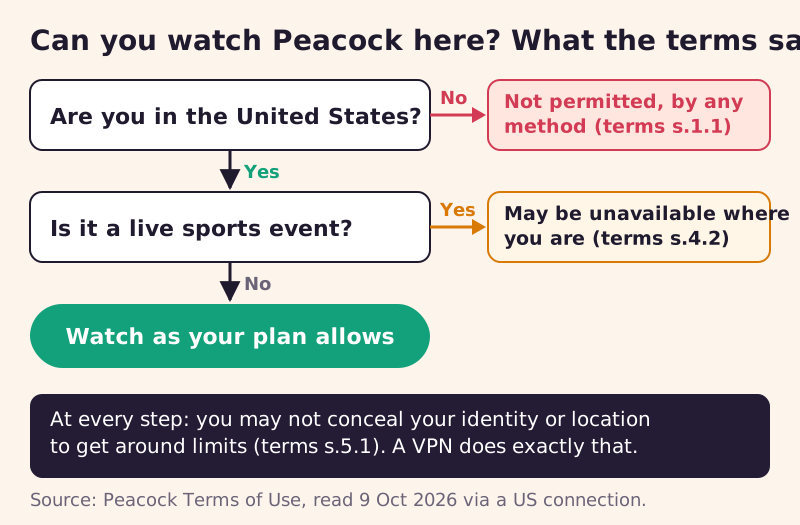
Inside the US, Peacock's terms don't mention VPNs by name, but section 5.1 lists among prohibited actions any attempt to "conceal your identity or location, including in an attempt to circumvent limits". Read literally, that covers a VPN running while you watch, since hiding your location is exactly what a VPN does. Peacock doesn't publish how it detects VPNs, so we can't tell you how often a VPN connection gets refused, only that the terms give Peacock grounds to act.
Abroad, the question is settled before any VPN comes into it. Section 1.1 of the terms says: "You may not access or use the Peacock Service if you are outside of the United States." There is no holiday or travel exception in the terms we read. A VPN would make your connection appear to be in the US, which is the concealment section 5.1 prohibits.
Where Peacock is available, and where it isn't
Peacock's terms describe a service for people in the United States, and its help centre lists the US plus five US territories as where it streams: American Samoa, Guam, the Northern Mariana Islands, Puerto Rico and the US Virgin Islands. That's narrower than many streaming services, which exist in dozens of countries with different catalogues. With Peacock, leaving the US doesn't mean a smaller library; under the terms, it means no access at all until you're back.
If you live outside the US, the same terms exclude you, which is why we don't cover ways for non-US residents to sign up. Programmes that appear on Peacock in the US are sometimes licensed to other services in other countries, so the practical step is to search your local services for the show you want. We haven't verified any specific titles or deals, so check locally.
Downloads are a common workaround on other services, so it's worth being clear here: we found no Peacock page saying downloaded programmes can be watched outside the US, the terms' US-only wording gives no exception for them, and section 4.4 says downloads may be subject to geographic restrictions on playback. Don't plan a trip around Peacock downloads unless Peacock confirms they'll play where you're going.
Live sports: why they're blocked differently
Sport adds a second layer of location rules even inside the US. Section 4.2 of Peacock's terms says some sports content may be unavailable because of your location or blackout restrictions, that Peacock may use different technologies and methods to verify your location when you sign up, and that accessing content from a location that doesn't have the rights isn't permitted. In other words, a US subscriber can still find a particular game unavailable where they are.
This is the same logic MLB.TV and other sports streams use: the rights to a live event are sold by territory, and the streamer has to honour each deal. A VPN that moves you to another US city or state to reach a blacked-out game is concealing your location to get around a limit, which the terms prohibit. On-demand shows and films don't usually carry those local restrictions, so they're less affected when you travel within the US.
Why Peacock doesn't simply follow you abroad
Streaming rights are sold country by country. A service pays for the right to show a film, a series or a league's games to viewers in particular territories, and a deal for the US says nothing about viewers in Spain or Japan. Services that operate in many countries juggle a separate deal for each, which is why their catalogues change at the border. Peacock's terms take the simpler route of serving the US only, so there is no foreign version to switch you to.
That's also why the terms care about concealed locations at all. If Peacock let viewers appear to be in the US from anywhere, it would be showing content in places it has no rights to show it, which is precisely what its licence deals forbid. The ban on hiding your location is the contractual consequence, not a dislike of VPNs as such.
Peacock's terms on location, section by section
These three passages decide every situation in this guide. We quote them as written on the Peacock terms page we read on 9 October 2026.
| Section | What it says | What it means for a VPN |
|---|---|---|
| 1.1 Eligibility | You may not access or use the Peacock Service if you are outside of the United States | No Peacock abroad, with or without a VPN |
| 4.2 Content availability and blackouts | Some sports content may be unavailable due to location or blackouts; location may be verified at sign-up | Live sport can be restricted inside the US too |
| 5.1 Prohibited actions | Concealing your identity or location to get around limits, such as geographic content restrictions, is prohibited | Using a VPN to change your apparent location breaks the terms |
The terms don't spell out a specific penalty in these sections, so we won't guess one. What a breach gives Peacock is grounds to act on your account under its terms, and the subscription you'd risk is one you've already paid for.
What Peacock costs, and why it matters before a trip
Peacock's help pages listed three US plans on 9 October 2026, before tax: Select at $8.99 a month or $89.99 a year, Premium at $12.99 a month or $129.99 a year, and Premium Plus at $19.99 a month or $199.99 a year. Those numbers matter to travellers because you can't use Peacock outside the US, and how you're billed decides what an absence costs you.
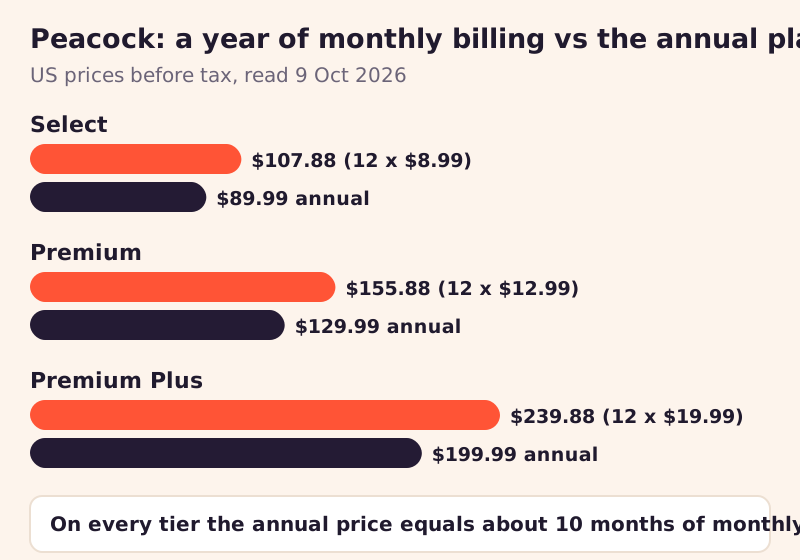
On every tier the annual price equals roughly 10 months of monthly billing. So if you spend two or more months a year outside the US and would cancel a monthly plan while away, monthly billing costs about the same or less than the annual plan, and you aren't paying for months you can't use. If you're in the US most of the year, the annual plan is the cheaper choice.
If Peacock blocks you inside the US
US subscribers occasionally hit a location problem at home. The common causes are a VPN or proxy left running, a work or campus network that routes traffic elsewhere, or a live event restricted where you are. Turn off any VPN or proxy and reload; if it's a live game, check whether it's blacked out in your area before assuming a fault. If on-demand titles still won't play on an ordinary home connection, Peacock's support team is the right next step, not a VPN, which would only add the concealment the terms prohibit.
Traveller setup, step by step
- Before you leave the US, watch or plan around anything time-sensitive, especially live sport, because the terms give you no access abroad.
- If you're on monthly billing and will be away for a month or more, decide whether to keep paying for the time you're away.
- Put a VPN on the devices you're taking and let it switch itself on whenever you join a network you don't trust, such as hotel or airport Wi-Fi.
- Back in the US or travelling within it, switch the VPN off, or leave the Peacock app out of the tunnel, when you stream, so your location is shown honestly.
- For live sport on a domestic trip, expect that some events may be restricted where you are, and check the listing before game day.
A VPN still earns its place in your bag, just not as a Peacock key. On shared Wi-Fi it keeps your logins and browsing private from the network and anyone else on it. NordVPN and ExpressVPN each give new customers 30 days to ask for a refund (checked 9 October 2026), which gives you time to check the apps suit your devices. Those are affiliate links, so a subscription through them pays ReelRoam a commission. For other services you pay for, our guide to watching your streaming subscriptions abroad covers what each allows. Our streaming VPN picks compare the providers themselves.
Edge cases
- Peacock through another provider: if you get Peacock bundled with a TV or phone plan, Peacock's terms still govern how you use it.
- Travelling within the US: on-demand viewing follows you; some live sports may not, because of local rights.
- Signing up from abroad: Peacock says it may verify your location at sign-up, so creating an account outside the US isn't a route in.
- Smart TVs and streaming sticks: most can't run a VPN app, which suits Peacock's rules, since the TV then shows your real location anyway.
These cases share the same answer as the rest of the guide: Peacock judges access by where you are, and its terms forbid hiding it. Knowing that before you travel saves a frustrating evening in a hotel room.
Peacock and VPNs: quick answers
Can I use a VPN with Peacock?
Can I watch Peacock outside the US?
Why is a live game unavailable on Peacock in the US?
Does Peacock check my location?
Should I pay monthly or yearly for Peacock if I travel?
See the bigger picture: the best VPNs for streaming, ranked by track record, or start with a VPN for Netflix.